Switching from WellSky
Move from WellSky to CareLX, as easy as 1-2-3
The software isn't the hard part. Your data is. Watch two agencies send their files as they are, and see what CareLX does with them.
Captions are in the player's menu.
The move, in three steps
What moving to CareLX looks like
Step 1 · Automatic data migration
However you have it today, CareLX can use it
Send it as it is. You don't need to clean it up first.
The Excel workbook
you've kept for years
Reports printed to PDF
straight from a web screen
Invoice exports
CSV, Excel, or PDF
A folder of client files
or a zip of all of it
Two agencies, two very different setups
What CareLX does with your files
Both agencies sent their files exactly as they keep them. CareLX worked out what each file holds.
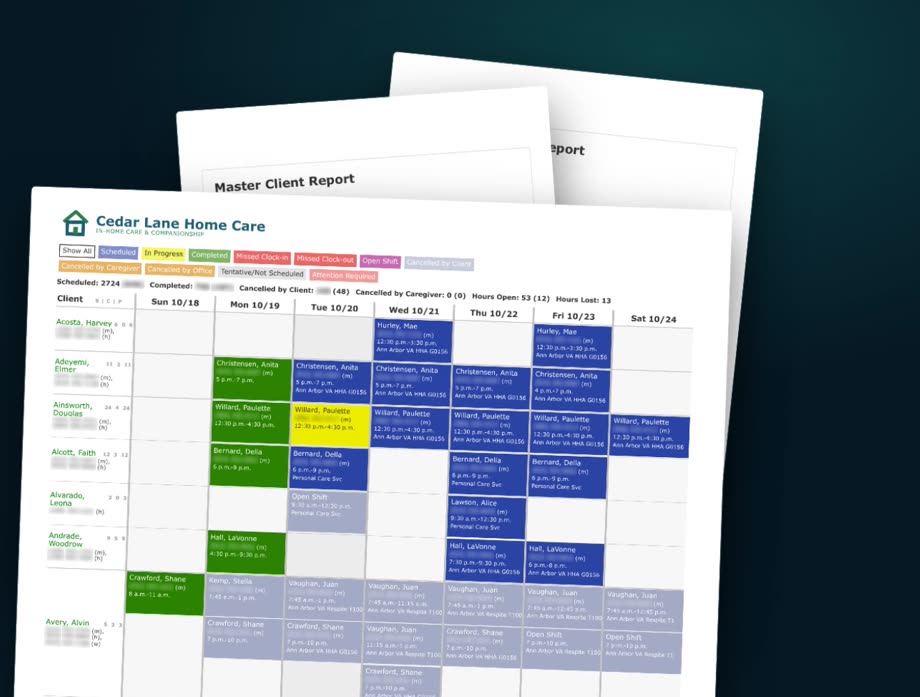
Example 1 · Sample data
Cedar Lane Home Care
Three WellSky reports, printed to PDF: the caregiver list, the client list, and a week of the schedule. No export file, no special format. Just the pages.
- CareLX names each file: a caregiver list, a client list, and a weekly schedule.
- It reads the schedule's color legend and works out the grid: a row for each client, a column for each day, and each visit's status from its color.
- It reads the services: "Ann Arbor VA HHA G0156" becomes a Home Health Aide visit, paid by the VA.
- It puts the same person together across all three files, and checks every address on the map.
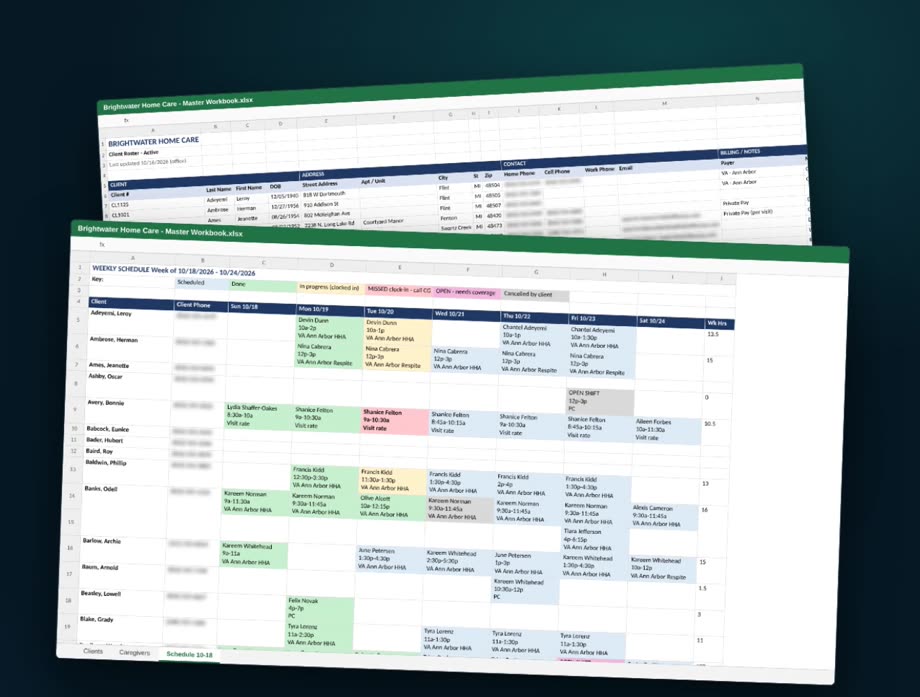
Example 2 · Sample data
Brightwater Home Care
One workbook: a tab for clients, a tab for caregivers, and a weekly schedule where the cell color is the status.
- CareLX finds all three tabs, and reads the color key in row two.
- It reads the agency's shorthand: "PC" becomes Personal Care.
- The clients arrive in CareLX ready to schedule.
Two completely different files, one clean result
- clients
- 182clients
- caregivers
- 164caregivers
- visits
- 694visits
From three WellSky PDFs, and from one Excel workbook.
You see every record exactly as it will arrive, before anything goes in.
Nothing is written until you press Load, and nothing is sent to anyone.
If anything looks wrong, one click rolls the load back.
Cedar Lane Home Care and Brightwater Home Care are sample agencies. The people in their files are made up.
Step 2
Your dedicated migration manager
One named person who plans your move with you and keeps your agency running while you switch. No gaps, and no lost weekend.
- Plans your move with you
- Runs every import
- Checks the counts against your old system
- Keeps your schedule and payroll running while you switch
Step 3 · Training and user adoption
See one, do one, teach one, own one
Every person on your team learns CareLX on their own agency's work, one workflow at a time.
See one
Watch a CareLX specialist complete a real workflow from your agency.
Do one
Complete that same workflow yourself, in a safe training environment.
Teach one
Explain and show the workflow to another person on your team.
Own one
Run the workflow on your own in your live agency, with support right there when you need it.
Once you're in
Where CareLX pays for itself
Hours you're already authorized for
CareLX compares every client's authorized hours with what's on the schedule. One click proposes the visits to fill the gap, so authorized hours become billed hours instead of lost revenue.
853.5
authorized hours not delivered, in Cedar Lane's sample week
Fewer miles of driving
When caregivers have several visits a day, CareLX re-plans their routes.
About 189
fewer miles of total driving, in Cedar Lane's sample week
Credentials renewed before they lapse
Pick your reminder days. Each reminder reaches the caregiver, alerts HR, and lands in your queue as a task to finish, before anyone falls off the schedule.
30 · 21 · 15 · 7
days before a credential expires, for example
Cedar Lane's figures come from its savings report, on sample data. Your agency's numbers will be different.
FAQ
Questions agencies ask about the move
Do I need to export my data from WellSky in a special format?
No. Send what you have: reports printed to PDF, an Excel workbook, CSV or invoice exports, a folder of client files, or a zip of all of it. You don't need to clean anything up first.
Does anything change in CareLX before I'm ready?
No. You see every record before it goes in, and nothing is written until you press Load. Loading sends nothing to anyone, and if something looks wrong, one click rolls the load back.
Who does the work of the move?
Your migration manager, one named person who plans the move with you, runs every import, and checks the counts against your old system while your schedule and payroll keep running.
Is there a fee for setup?
Setup and onboarding are included in every CareLX plan, and there is no implementation fee.
When can I leave my WellSky contract?
Check your WellSky order form for the end of your term. WellSky's standard agreement renews for one-year terms unless you give 90 days' written notice, so plan the move before that date.
Weighing WellSky and CareLX side by side? Read the comparison
Video transcript
The hard part is your data
Thinking about leaving WellSky? The software isn't the hard part. Your data is. Years of clients, caregivers, schedules and billing, kept in reports, exports, and spreadsheets only your office understands.
With CareLX, moving over is as easy as one, two, three. One: automatic data migration. Two: a dedicated migration manager, so your operations never skip a beat. Three: training that sticks, for every person on your team.
Step 1: send what you have
Let's start with your data. However you have it today, CareLX can use it.
The Excel workbook you've kept for years, the one no one else would understand. Reports from your current software, printed to PDF straight from a web screen. An export of your invoices, or a folder full of client files.
Send us all of it, as it is. You don't need to clean it up first.
Example 1: Cedar Lane's three PDFs
Here's an example. Cedar Lane Home Care printed three reports from WellSky to PDF: their caregiver list, their client list, and a week of their schedule. No export file, no special format. Just the pages.
We start Cedar Lane's import and drop in the three PDFs. In seconds, CareLX reads every page and tells us what each file is: a caregiver list, a client list, and a weekly schedule. Even the schedule's color legend: scheduled, in progress, completed, missed, cancelled.
CareLX works out how the schedule is laid out: a row for each client, a column for each day, and each visit's status from its color. Before anything goes in, you see the records exactly as they'll arrive. 694 visits, from a printout.
It reads the services too. Ann Arbor VA HHA G0156 becomes a Home Health Aide visit, paid by the VA. Then CareLX puts the same person together across all three files, and checks every address on the map.
182 clients, 164 caregivers, and 694 visits, all ready. Nothing is written until you press Load, and nothing is sent to anyone. If anything looks wrong, one click rolls it back.
Example 2: Brightwater's workbook
Now a different agency, with a very different setup. Brightwater Home Care runs everything from one workbook: a tab for clients, a tab for caregivers, and a weekly schedule where the cell color is the status.
We drop in the workbook, as is. CareLX finds all three tabs, and reads the color key in row two. Their shorthand, too. PC becomes Personal Care.
The check comes back: the same 182 clients, 164 caregivers and 694 visits as the PDFs. Two completely different files, one clean result. And here are Brightwater's clients, in CareLX, ready to schedule.
Step 2: your migration manager
Step two: your dedicated migration manager. One named person who plans your move with you, runs every import, checks the counts against your old system, and keeps your schedule and payroll running while you switch. No gaps, and no lost weekend.
Step 3: training that sticks
Step three: training and user adoption, built on a simple method.
See one: watch a CareLX specialist complete a real workflow from your agency. Do one: complete that same workflow yourself, in a safe training environment. Teach one: explain and show the workflow to another person on your team. Own one: run the workflow on your own in your live agency, with support right there when you need it.
Where CareLX pays for itself
And once you're in, here's where CareLX pays for itself.
First, revenue you're already authorized for. CareLX compares every client's authorized hours with what's scheduled. In this demo agency, this VA client is authorized for 24 hours a week, and only three are on the schedule. One click proposes the visits to fill the gap, so authorized VA hours turn into billed hours instead of lost revenue. In Cedar Lane's sample week, CareLX found more than 850 authorized hours that weren't delivered.
Second, travel. When caregivers have several visits a day, CareLX re-plans the routes. For Cedar Lane's same week, that was about 189 fewer miles of driving.
Third, caregiver certifications. Set your reminder days, like 30, 21, 15 and 7 days before a credential expires. Each reminder reaches the caregiver, alerts HR, and lands in your queue as a task to finish, before anyone falls off the schedule.
Send us whatever you have today. We'll show you your own agency, running in CareLX.
Send us whatever you have today
We'll show you your own agency, running in CareLX.
Rather start on your own? Answer a few questions, and we build a demo agency that looks like yours
WellSky and ClearCare are trademarks of their owner. CareLX is not affiliated with, endorsed by, or sponsored by WellSky.